


A big thanks to Metehan Yeşilyurt for his work on the original JavaScript snippets that I built my modified version on.
When people use AI tools to search for information, they type in a question—and then the AI quickly searches for dozens of other related topics at the same time.
These extra searches are called fan-out queries, and knowing what fan-out queries lead to your site can be helpful for AI SEO.
There are a number of tools advertising fan-out query gathering as a feature, but you can do this using a tool that a lot of SEOs already have access to: Screaming Frog.
1. Select your APIs
In order for this process to work, you’re going to need to connect your Screaming Frog application to one or more large language models (LLMs) via application programming interfaces (APIs).
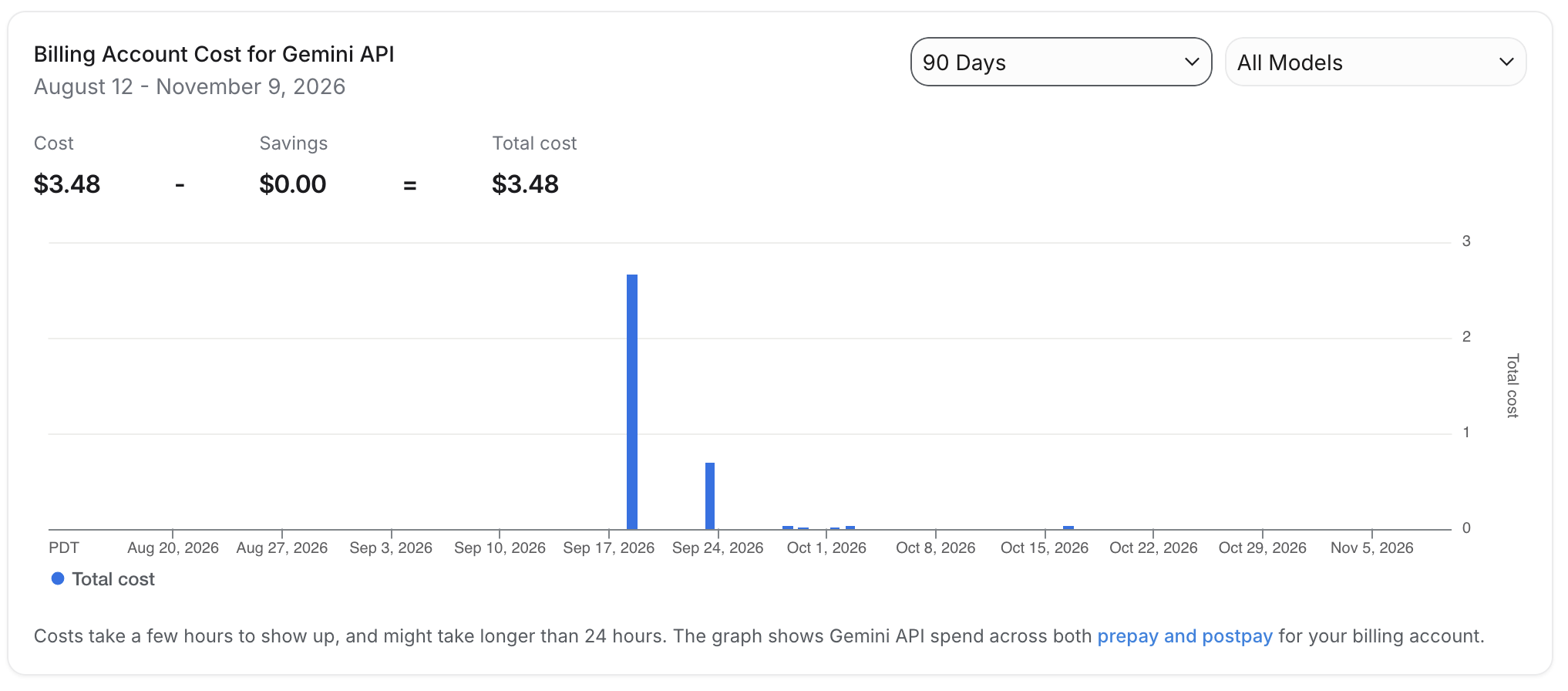
In this example, I’ll be using the Gemini and OpenAI LLMs. Both are pretty cheap to use right now—you can prepay with an amount of about $10 per LLM to and that should be more than enough to get started.
You’ll need to generate API tokens for each of your selected LLMs and give them a name; I labeled mine “Screaming Frog integration” so it was easy to track usage in my dashboards.
2. Turn on JavaScript rendering in Screaming Frog
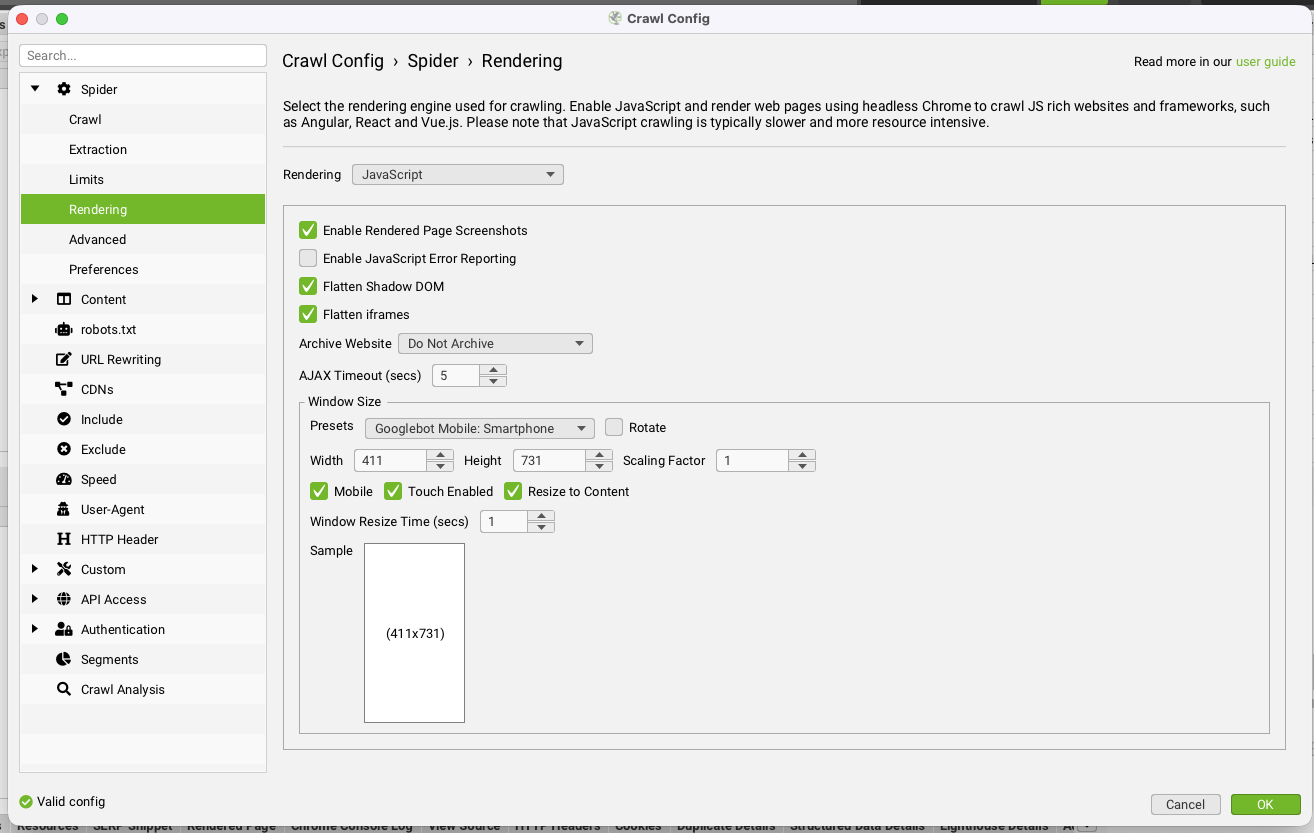
Next, you’ll need to open up Screaming Frog and turn on JavaScript rendering.
You can do this by clicking on Crawl Configuration > Spider > Javascript, but if you forget, Screaming Frog will prompt you to enable this when you try to run an API call.
3. Create your Gemini API instructions
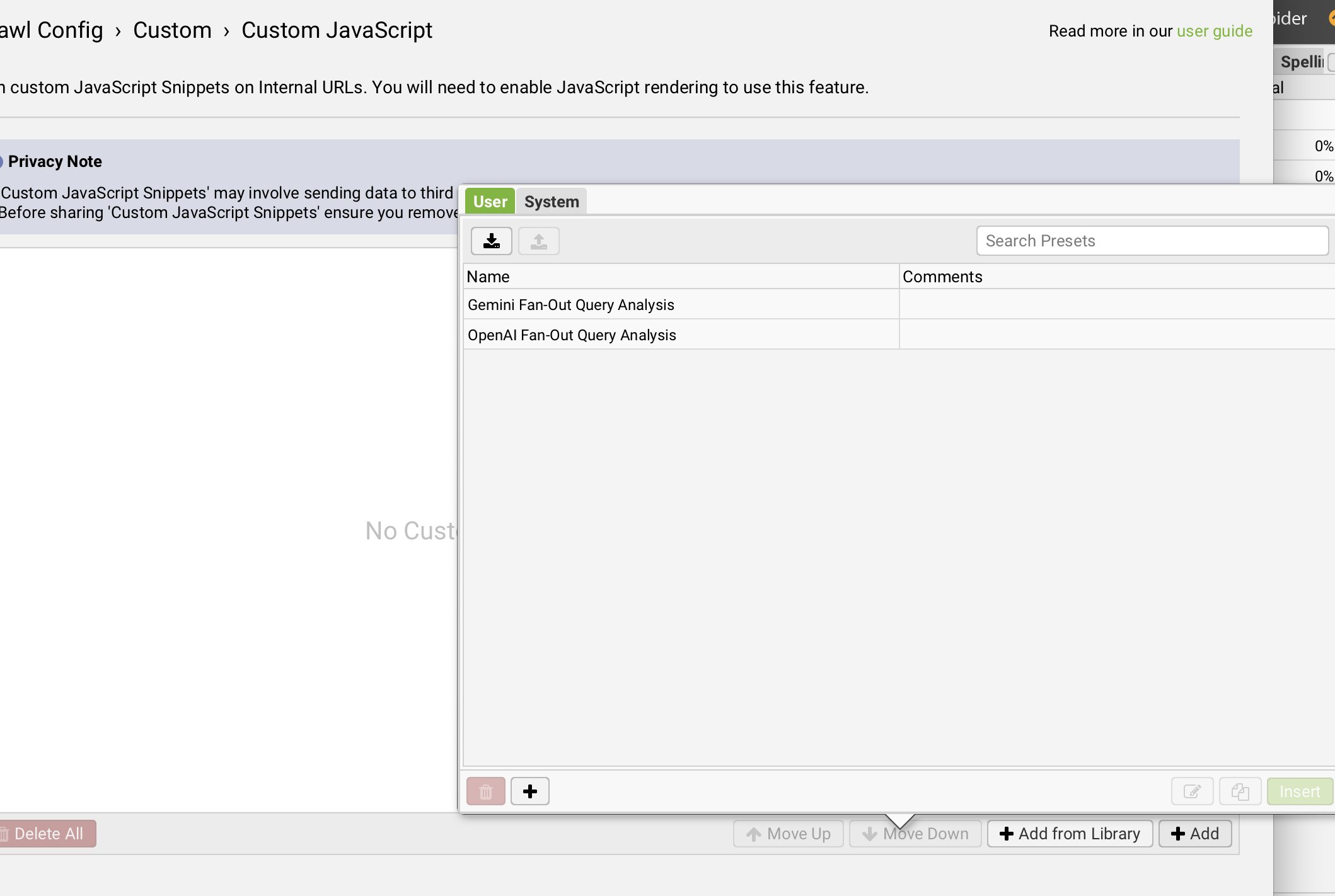
Remain in the Crawl Config menu and click on “Custom” and then “Custom JavaScript.” Create a new snippet, and then:
- Give it a title that includes the LLM name and the purpose of the snippet
- Set the parameters to “extraction” and “text/html”
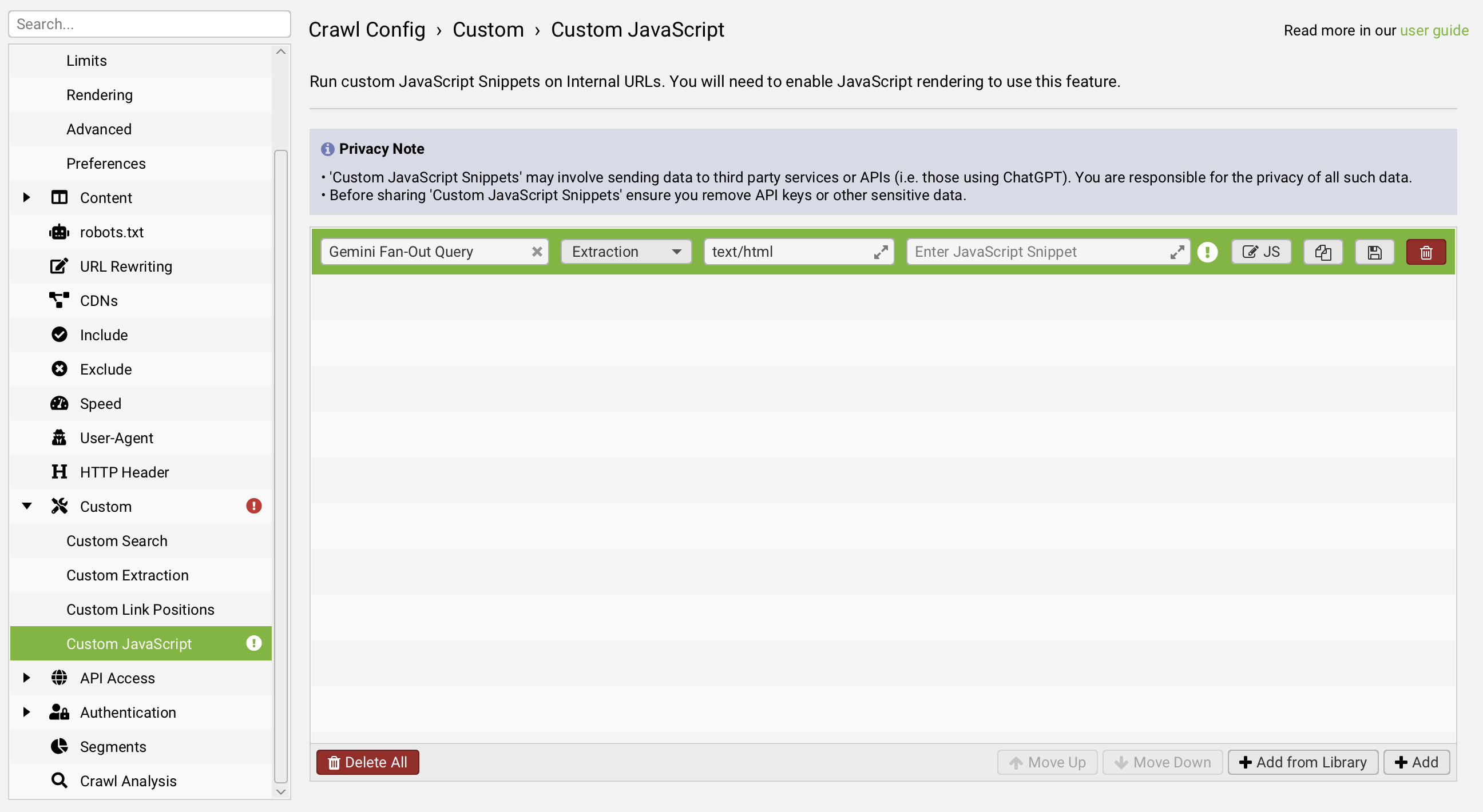
Next, enter this JavaScript snippet that I modified from this older snippet shared by Metehan (I updated the model and removed Metehan's original "recommendations" structure that had the LLM return next-steps suggestions in addition to the query fan-outs).
// Gemini AI Query Fan-Out Detection for Screaming Frog
// Replace with your actual Gemini API key
const apiKey = 'PUT\_YOUR\_GEMINI\_API\_CODE\_HERE';

// Extract semantic chunks from page (layout-aware chunking)
function extractSemanticChunks() {
  const chunks = [];

  // Extract title and main heading
  const title = document.title || '';
  const h1 = document.querySelector('h1')?.textContent || '';
  if (title || h1) {
    chunks.push({
      type: 'primary_topic',
      content: `${title} ${h1}`.trim()
    });
  }

  // Extract headings and their content (layout-aware chunking)
  const headings = document.querySelectorAll('h2, h3');
  headings.forEach(heading => {
    let content = heading.textContent;
    let sibling = heading.nextElementSibling;
    let sectionContent = '';

    while (sibling && !['H1', 'H2', 'H3'].includes(sibling.tagName)) {
      if (sibling.textContent) {
        sectionContent += ' ' + sibling.textContent;
      }
      sibling = sibling.nextElementSibling;
    }

    if (sectionContent.trim()) {
      chunks.push({
        type: 'section',
        heading: content,
        content: sectionContent.trim().substring(0, 500)
      });
    }
  });

  // Extract key lists and FAQs
  document.querySelectorAll('ul, ol').forEach((list, idx) => {
    if (idx < 5 && list.children.length > 2) {
      chunks.push({
        type: 'list',
        content: Array.from(list.children).map(li => li.textContent).join(' | ').substring(0, 300)
      });
    }
  });

  // Extract schema.org data if present
  const schemas = document.querySelectorAll('script[type="application/ld+json"]');
  schemas.forEach(schema => {
    try {
      const data = JSON.parse(schema.textContent);
      if (data['@type']) {
        chunks.push({
          type: 'structured_data',
          content: `Type: ${data['@type']}, ${JSON.stringify(data).substring(0, 200)}`
        });
      }
    } catch (e) {}
  });

  // === OPTIONAL FULL BODY FALLBACK ===
  // Uncomment this block if you want to include the raw main body content
  /*
  const mainBody = document.querySelector('main, article, .post-content, #content');
  if (mainBody && mainBody.textContent.trim().length > 300) {
    chunks.push({
      type: 'full_body_fallback',
      content: mainBody.textContent.trim().substring(0, 2000)
    });
  }
  */

  return chunks;
}

try {
  const url = window.location.href;
  const chunks = extractSemanticChunks();

  // Create comprehensive prompt for Gemini
  const prompt = `You are analyzing a webpage for Google's AI Mode query fan-out potential. Google's AI Mode decomposes user queries into multiple sub-queries to synthesize comprehensive answers.

URL: ${url}

SEMANTIC CHUNKS FROM PAGE:
${JSON.stringify(chunks, null, 2)}

Based on this content, perform the following analysis:

1. IDENTIFY PRIMARY TOPIC: What is the main ontological entity or topic of this page?

2. PREDICT FAN-OUT QUERIES: Generate 8–10 likely sub-queries that Google's AI might create when a user asks about this topic. Consider:
   - Related queries (broader context)
   - Implicit queries (unstated user needs)
   - Comparative queries (alternatives, comparisons)
   - Procedural queries (how-to aspects)
   - Contextual refinements (budget, size, location specifics)
   - Potential Google classifications (Google’s best-in-class information systems, and it’s built right into Search. Fresh, real-time sources like the Knowledge Graph, info about the real world, and shopping data for billions of products)

3. SEMANTIC COVERAGE SCORE: For each predicted query, assess if the page content provides information to answer it (Yes/Partial/No).

4. FOLLOW-UP QUESTION POTENTIAL: What follow-up questions would users likely ask after reading this content?

OUTPUT FORMAT:
PRIMARY TOPIC: [entity name]

FAN-OUT QUERIES:
• [Query 1] - Coverage: [Yes/Partial/No]
• [Query 2] - Coverage: [Yes/Partial/No]
...

FOLLOW-UP POTENTIAL:
• [Follow-up question 1]
• [Follow-up question 2]
...

COVERAGE SCORE: [X/10 queries covered]
RECOMMENDATIONS: [Specific content gaps to fill]`;

  // Call Gemini API
  const requestData = {
    contents: [{
      parts: [{
        text: prompt
      }]
    }],
    generationConfig: {
      temperature: 0.3,
      topK: 20,
      topP: 0.9,
      maxOutputTokens: 2048
    }
  };

  const xhr = new XMLHttpRequest();
  xhr.open('POST', `https://generativelanguage.googleapis.com/v1beta/models/gemini-2.5-flash:generateContent?key=${apiKey}`, false);
  xhr.setRequestHeader('Content-Type', 'application/json');

  xhr.send(JSON.stringify(requestData));

  if (xhr.status === 200) {
    const response = JSON.parse(xhr.responseText);

    if (response.candidates && response.candidates[0] && response.candidates[0].content) {
      let analysis = response.candidates[0].content.parts[0].text;

      // Add chunking summary
      let output = '=== GOOGLE AI MODE QUERY FAN-OUT ANALYSIS ===\n\n';
      output += analysis;
      output += '\n\n=== CONTENT CHUNKING SUMMARY ===\n';
      output += `• Primary Topic Chunks: ${chunks.filter(c => c.type === 'primary_topic').length}\n`;
      output += `• Section Chunks: ${chunks.filter(c => c.type === 'section').length}\n`;
      output += `• List/FAQ Chunks: ${chunks.filter(c => c.type === 'list').length}\n`;
      output += `• Structured Data: ${chunks.filter(c => c.type === 'structured_data').length > 0 ? 'Yes' : 'No'}\n`;
      output += `• Fallback Body Chunk: ${chunks.some(c => c.type === 'full_body_fallback') ? 'Yes' : 'No'}\n`;
      output += `• Total Semantic Chunks: ${chunks.length}`;

      return seoSpider.data(output);
    } else {
      return seoSpider.error('Invalid Gemini response');
    }
  } else {
    return seoSpider.error(`API Error: ${xhr.status}`);
  }
} catch (error) {
  return seoSpider.error(`Error: ${error.toString()}`);
}
You must update the API placeholder section to use your actual Gemini API code! Keep the `` marks on either side of the API key:
const apiKey = 'PUT\_YOUR\_GEMINI\_API\_CODE\_HERE';Don’t forget to save your snippet to your library when done, as this will allow you to quickly add it to Screaming Frog crawls in the future.
4. Create your OpenAI instructions
Start by creating yet another snippet as outlined above. When it comes time to enter in the JavaScript, use this snippet (again modified from the one shared by Metehan; this time I used OpenAI to confirm the updated parameters based on current model availability):
// OpenAI Query Fan-Out Detection for Screaming Frog
const openaiApiKey = 'sk-proj-xxxx';
const model = 'gpt-5.6-luna';

function extractSemanticChunks() {
  const chunks = [];

  const title = document.title || '';
  const h1 = document.querySelector('h1')?.textContent || '';
  if (title || h1) {
    chunks.push({
      type: 'primary_topic',
      content: `${title} ${h1}`.trim()
    });
  }

  const headings = document.querySelectorAll('h2, h3');
  headings.forEach(heading => {
    let content = heading.textContent;
    let sibling = heading.nextElementSibling;
    let sectionContent = '';

    while (sibling && !['H1', 'H2', 'H3'].includes(sibling.tagName)) {
      if (sibling.textContent) {
        sectionContent += ' ' + sibling.textContent;
      }
      sibling = sibling.nextElementSibling;
    }

    if (sectionContent.trim()) {
      chunks.push({
        type: 'section',
        heading: content,
        content: sectionContent.trim().substring(0, 500)
      });
    }
  });

  document.querySelectorAll('ul, ol').forEach((list, idx) => {
    if (idx < 5 && list.children.length > 2) {
      chunks.push({
        type: 'list',
        content: Array.from(list.children).map(li => li.textContent).join(' | ').substring(0, 300)
      });
    }
  });

  const schemas = document.querySelectorAll('script[type="application/ld+json"]');
  schemas.forEach(schema => {
    try {
      const data = JSON.parse(schema.textContent);
      if (data['@type']) {
        chunks.push({
          type: 'structured_data',
          content: `Type: ${data['@type']}, ${JSON.stringify(data).substring(0, 200)}`
        });
      }
    } catch (e) {}
  });

  return chunks;
}

try {
  const url = window.location.href;
  const chunks = extractSemanticChunks();

  const prompt = `You are analyzing a webpage for fan-out potential.

URL: ${url}

SEMANTIC CHUNKS FROM PAGE:
${JSON.stringify(chunks, null, 2)}

Perform this analysis:

1. PRIMARY TOPIC: What's the main topic or entity?
2. FAN-OUT QUERIES: Predict 8–10 follow-up or decomposed queries that ChatGPT might generate to search the web for this related topic.
3. COVERAGE: For each, say if content on this page answers it (Yes/Partial/No).
4. FOLLOW-UP QUESTIONS users might ask after reading this page.

OUTPUT FORMAT:
PRIMARY TOPIC: [entity name]
FAN-OUT QUERIES:
• [Query] - Coverage: Yes/Partial/No
FOLLOW-UP QUESTIONS:
• [Q1]
COVERAGE SCORE: [X/10]`;

  const requestData = {
    model: 'gpt-4o',
    messages: [
      { role: 'system', content: 'You are an SEO analyst AI focused on fan-out predictions for ChatGPT search.' },
      { role: 'user', content: prompt }
    ],
    temperature: 0.3,
    max_tokens: 2048,
    top_p: 0.9,
    frequency_penalty: 0,
    presence_penalty: 0
  };

  const xhr = new XMLHttpRequest();
  xhr.open('POST', 'https://api.openai.com/v1/chat/completions', false);
  xhr.setRequestHeader('Content-Type', 'application/json');
  xhr.setRequestHeader('Authorization', `Bearer ${openaiApiKey}`);
  xhr.send(JSON.stringify(requestData));

  if (xhr.status === 200) {
    const response = JSON.parse(xhr.responseText);
    const content = response.choices?.[0]?.message?.content;

    if (content) {
      let output = '=== OPENAI AI MODE QUERY FAN-OUT ANALYSIS ===\n\n';
      output += content;
      output += '\n\n=== CONTENT CHUNKING SUMMARY ===\n';
      output += `• Primary Topic Chunks: ${chunks.filter(c => c.type === 'primary_topic').length}\n`;
      output += `• Section Chunks: ${chunks.filter(c => c.type === 'section').length}\n`;
      output += `• List/FAQ Chunks: ${chunks.filter(c => c.type === 'list').length}\n`;
      output += `• Structured Data: ${chunks.some(c => c.type === 'structured_data') ? 'Yes' : 'No'}\n`;
      output += `• Total Semantic Chunks: ${chunks.length}`;

      return seoSpider.data(output);
    } else {
      return seoSpider.error('Invalid OpenAI response.');
    }
  } else {
    return seoSpider.error(`OpenAI API Error: ${xhr.status}`);
  }
} catch (error) {
  return seoSpider.error(`Script Error: ${error.toString()}`);
}
Don’t forget to update the snippet with your actual OpenAI LLM API key before saving.
5. Locate the output tab in Screaming Frog
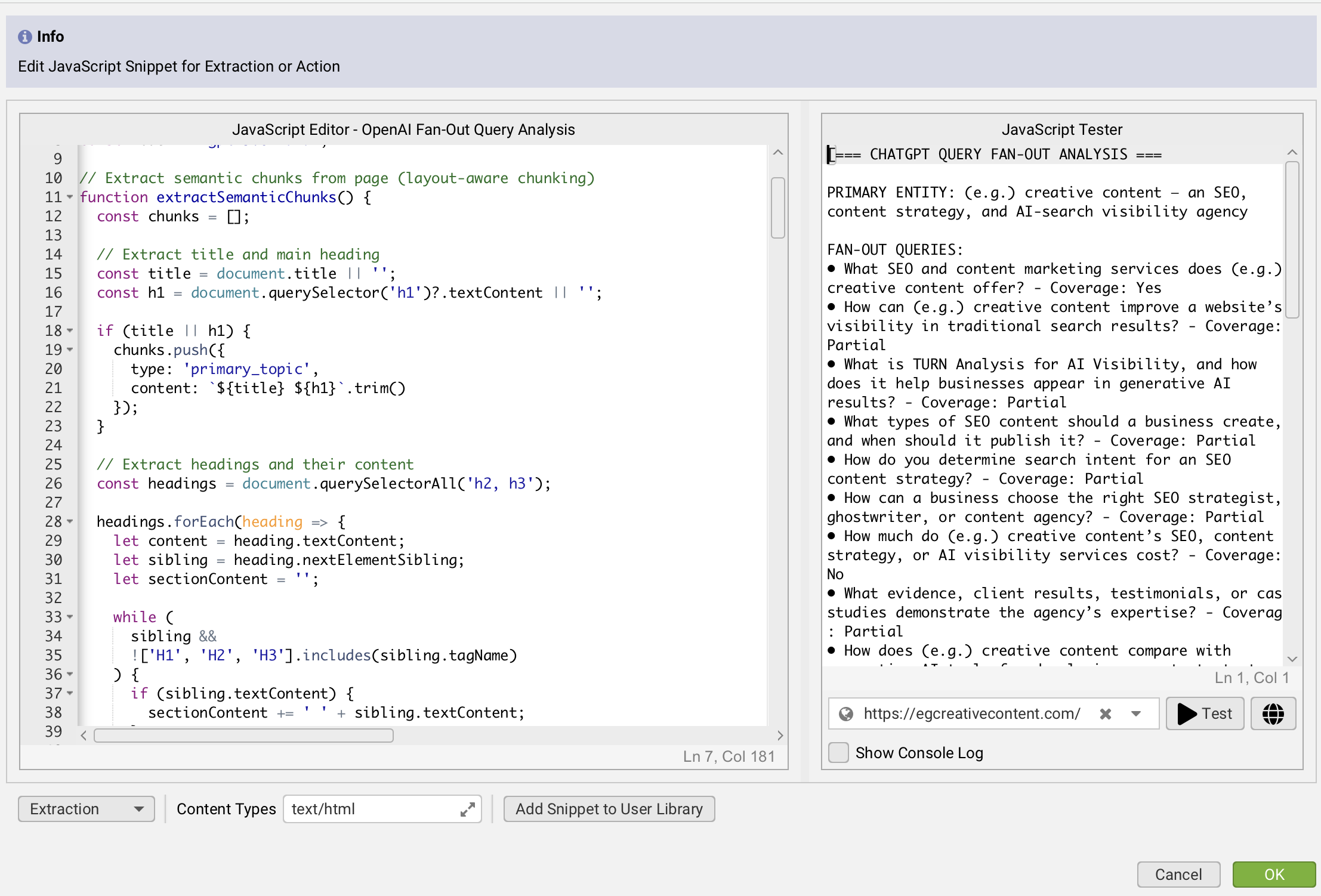
You’ll have to turn on these LLM connections each time you open up Screaming Frog—that’s why we saved them to the library, so they’re easy to re-add in the future.
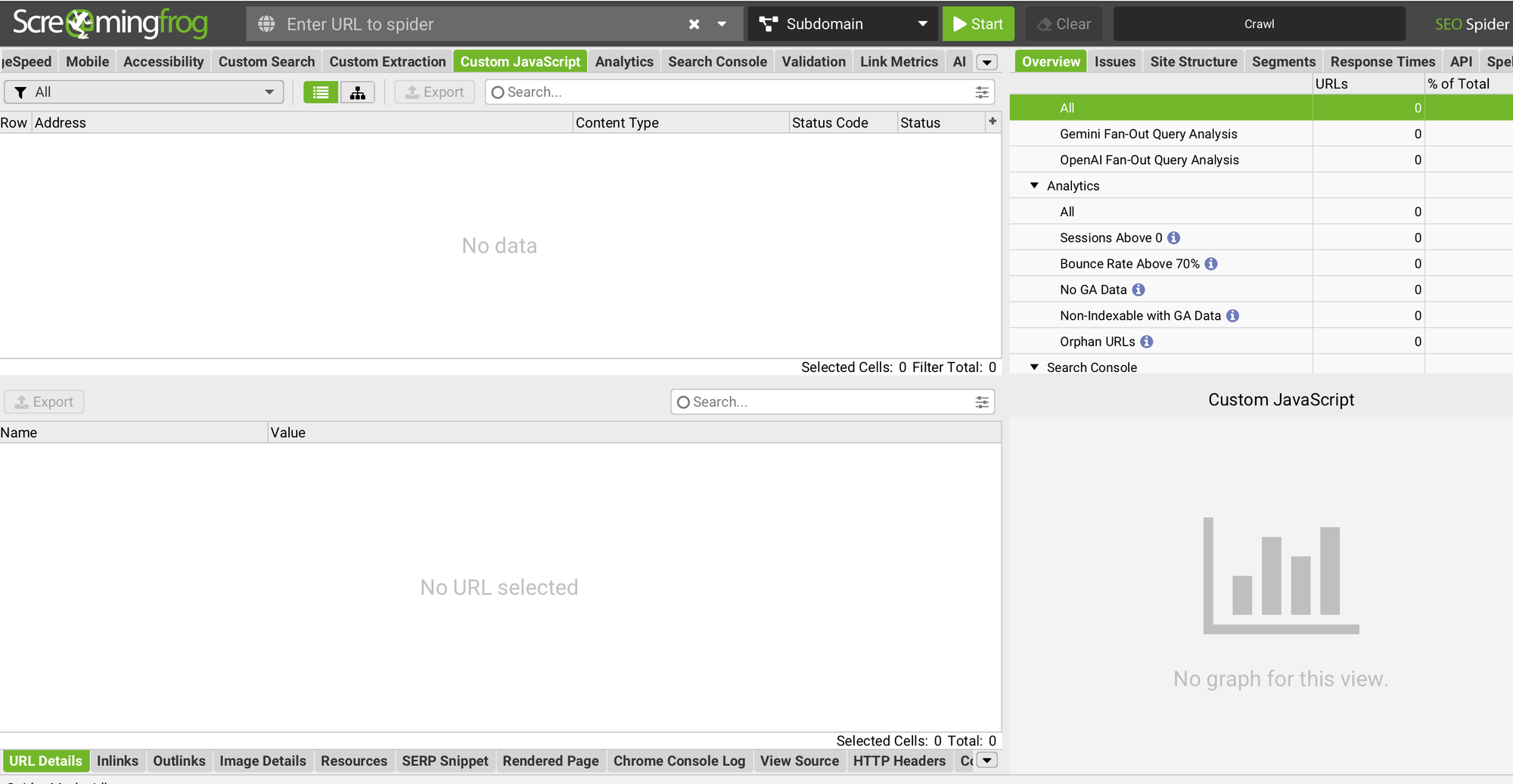
The outputs will appear in a tab labeled “Custom JavaScript” — you can drag this tab toward the left side to move its position in the Screaming Frog results window.
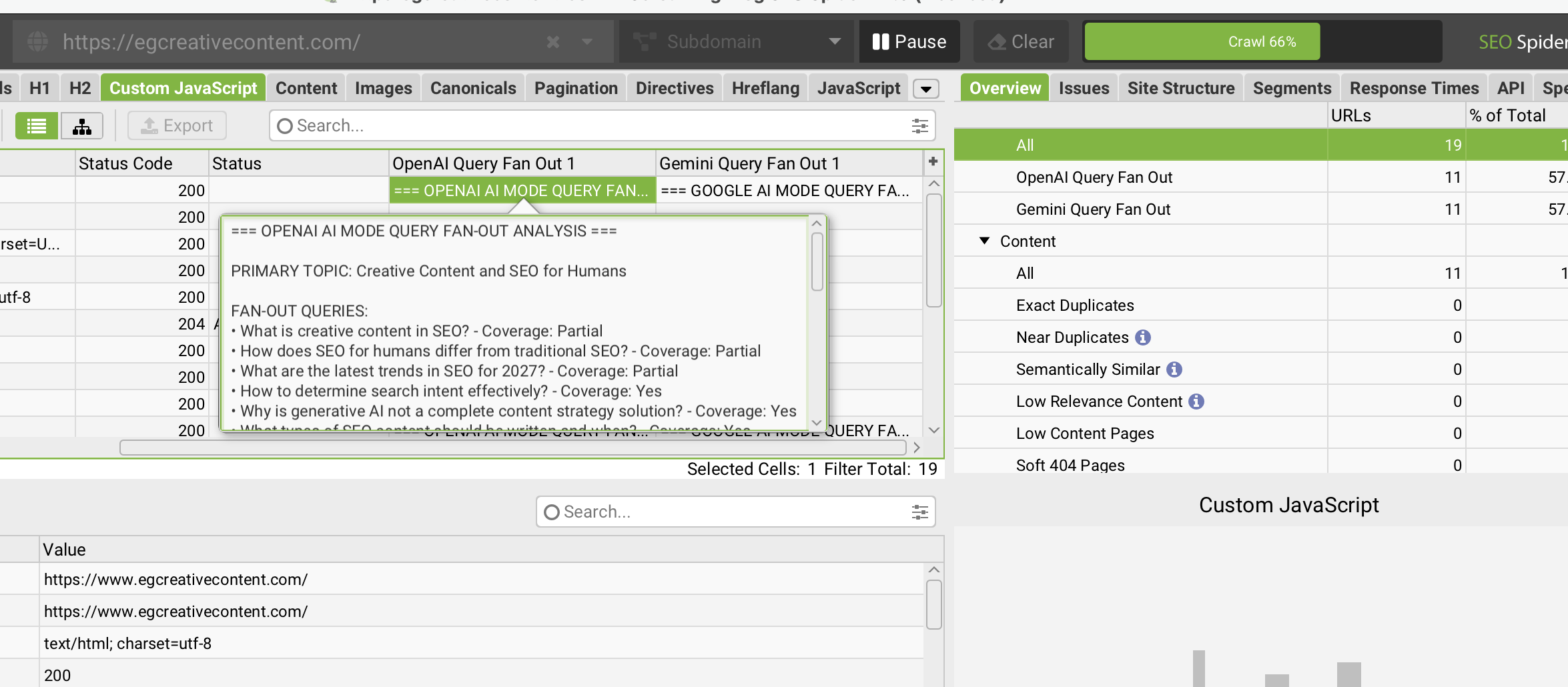
6. Reading and using the results
These JavaScript snippets prompt the connected LLMs to evaluate likely fan-out queries for a page and show you if the page content addresses those queries.
While this process of gathering fan-out queries isn’t 100% foolproof, that’s the tricky thing about AI search—LLMs are black boxes, so we can’t know exactly what they’re doing, when, and why. The expensive GEO tools that tell you they gather fan-out queries don’t really know what the fan-outs are in any greater detail, either. We’re all drawing upon what the LLM APIs provide us. This approach is a simply a more cost-effective, user-controllable option than subscribing to a GEO service specifically for fan-out query data.
You can also grab this JavaScript from GitHub or explore Metehan's original repo.